
UPI Autopay for NGO Donations: 2026 Guide
An end-to-end technical and operational blueprint for Indian non-profits implementing recurring monthly donations via Unified Payments Interface (UPI) Autopay. Discover how National Payments Corporation of India (NPCI) e-mandate protocols deliver over 90 percent donor retention, automate monthly Section 80G tax receipt pipelines, manage dunning retries, and synchronize seamlessly with annual Form 10BD reporting.
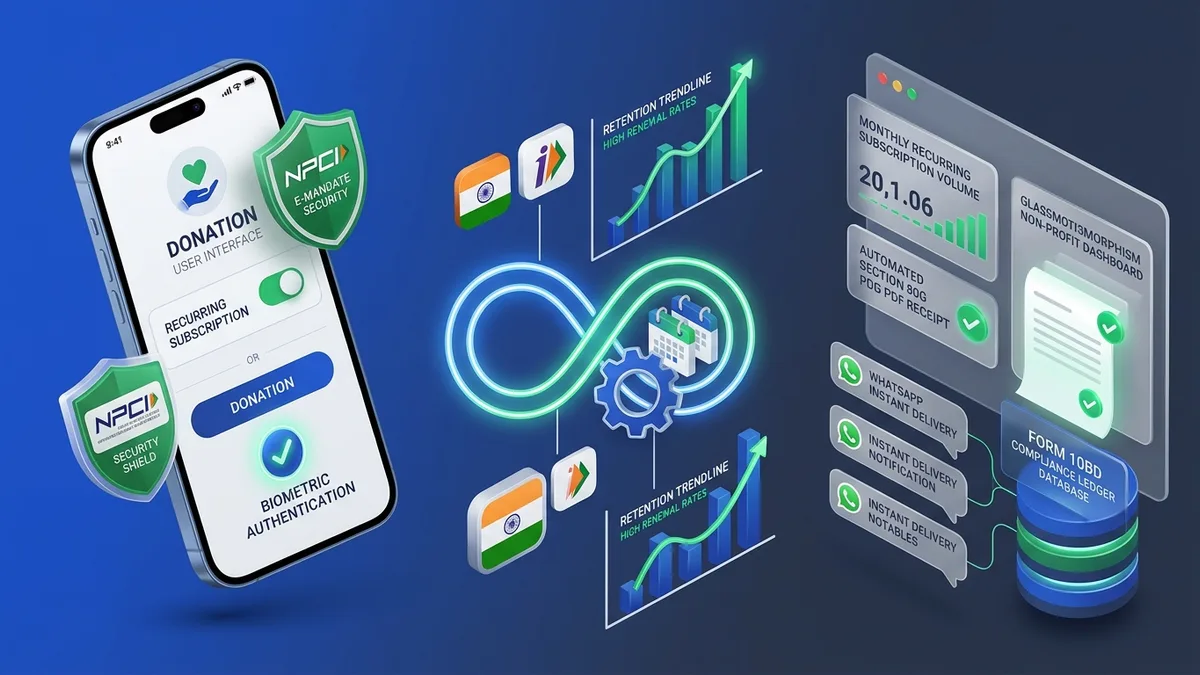
1. The Recurring Giving Crisis: One-Time Giving vs Sustained Monthly Cash Flow
Non-profit finance in India is notoriously volatile. Organizations often experience brief fundraising windfalls during festive seasons (Diwali, Daan Utsav) or sudden natural disasters, followed by nine months of financial drought where grassroots social workers struggle to meet basic program overheads, shelter rent, and staff salaries.
Acquiring a one-time donor costs Indian non-profits considerable advertising spend and volunteer outreach. Yet, national fundraising benchmarks reveal that less than nineteen percent of one-time retail donors ever contribute a second time. In stark contrast, donors enrolled in automated recurring monthly giving programs exhibit a twelve-month retention rate exceeding eighty-two percent and an average lifetime value six to nine times higher than one-time contributors.
The Predictable Revenue Engine: An NGO with five hundred supporters contributing ₹1,000 monthly secures ₹5,00,000 in reliable, un-earmarked operating income on the first day of every month. This stability allows leadership to plan long-term community interventions without perpetual fundraising anxiety.
2. What is UPI Autopay and the NPCI E-Mandate Architecture?
Introduced by the National Payments Corporation of India (NPCI), UPI Autopay enables recurring electronic mandates using the Unified Payments Interface architecture. Unlike traditional paper-based National Automated Clearing House (NACH) mandates that required physical signature verification and took two to three weeks to activate, UPI Autopay creates an active standing instruction within ten seconds.
The workflow operates through a secure, two-step protocol:
- One-Time Donor Authentication: The donor selects a monthly giving amount (for example, ₹500, ₹1,000, or ₹2,500) on the NGO website. The gateway generates a UPI Autopay mandate request that opens the donor preferred UPI app (Google Pay, PhonePe, Paytm, BHIM, Cred). The donor enters their UPI PIN once to authorize the mandate.
- Automated Subsequent Debits: On the scheduled recurring date each month, the payment engine issues a debit request against the mandate token. Debits up to ₹15,000 per transaction process automatically without requiring the donor to re-enter their UPI PIN or enter an OTP.
- Pre-Debit Notification: In compliance with Reserve Bank of India (RBI) mandates, NPCI dispatches an automated SMS/notification to the donor twenty-four to forty-eight hours prior to debit, maintaining full transparency and consumer trust.
3. Why UPI Autopay Crushes Credit Card Standing Instructions in India
Prior to UPI Autopay, non-profits relied on Credit Card Standing Instructions (CC SI). However, the implementation of RBI e-mandate rules and card tokenization guidelines in recent years severely disrupted card-based recurring donations.
| Feature & Metric | Credit Card Standing Instructions | UPI Autopay E-Mandate |
|---|---|---|
| Indian Market Penetration | ~100 million credit cards active nationwide | Over 350 million active UPI users across all demographics |
| Mandate Activation Latency | Requires 16-digit card entry, CVV, and 3D Secure OTP | Instant one-tap app switch and single UPI PIN entry (10 seconds) |
| Card Expiry & Re-issuance Churn | High churn: Cards expire every 3 to 5 years, breaking mandate | Near zero churn: Tied directly to donor core bank account (savings/current) |
| Average Recurring Success Rate | 55% to 70% (Subject to bank-specific tokenization drops) | 88% to 94% (Direct bank-to-bank settlement via NPCI rail) |
| Transaction Fee (MDR) | 1.85% to 2.5% plus GST | Competitive non-profit rates (typically 0% to 1.15% plus GST) |
4. Subscription Gateway Engines: Razorpay vs Cashfree vs PayU
To implement UPI Autopay, an NGO must partner with an RBI-authorized Payment Aggregator offering robust subscription management APIs:
Razorpay Subscriptions
The market leader for Indian non-profits. Offers ready-to-use Subscriptions APIs, automated pre-debit notifications, customizable customer portal for mandate management, and comprehensive webhook payloads.
Best for: Rapid deployment and turnkey webhook automation
Cashfree Subscriptions
Highly competitive transaction rates for registered charitable trusts. Strong developer documentation, granular retry scheduling, and flexible recurring frequency options (weekly, monthly, quarterly).
Best for: High-volume NGOs seeking lower MDR rates
PayU Subscriptions
Established institutional aggregator with deep banking tie-ups. Provides multi-rail fallback support across UPI Autopay, e-NACH, and debit cards.
Best for: Legacy institutions combining paper NACH with digital UPI
5. Technical Implementation: Mandate Creation to Instant Tokenization
Setting up UPI Autopay on a custom or WordPress website follows an architectural pipeline designed to capture statutory donor information prior to payment execution:
- Client-Side Intake Form: The donor inputs their full legal name, email, mobile number, postal address, and Permanent Account Number (PAN) alongside their recurring pledge amount. PAN formatting is verified in real time via client regex.
- Subscription Plan Creation: The NGO backend invokes the gateway API (e.g.,
POST /v1/subscriptions) specifyingperiod: 'monthly',interval: 1, and the donor metadata. - Checkout Initialization: The gateway SDK loads the checkout modal with UPI Autopay highlighted as the primary payment method.
- UPI App Handshake: On mobile devices, deep-linking invokes the installed UPI application. The donor inspects the mandate details (Max Amount: ₹1,000, Frequency: Monthly, Validity: 5 Years) and authorizes it with their UPI PIN.
- Webhook Tokenization: The gateway fires a
subscription.authenticatedwebhook to the NGO server, which records the unique mandate token (sub_id) in the database.
6. Automated Monthly Section 80G PDF Receipts and WhatsApp Delivery
A major administrative hurdle for NGOs operating recurring programs is managing tax receipts. Manually generating five hundred receipts every month is impossible for lean social work teams.
The solution is an automated event-driven webhook pipeline:
The Zero-Touch Receipt Engine: When the recurring payment succeeds, the gateway emits an invoice.paid webhook. An automation script (built with n8n or Node.js) consumes the payload, logs the sequential receipt number, generates a stamped Section 80G PDF receipt, and dispatches it directly to the donor WhatsApp and email inbox within thirty seconds of debit.
7. Smart Dunning Retries and Managing Failed Mandates
While UPI Autopay boasts high reliability, payment attempts can occasionally fail due to temporary insufficient bank account balance, nocturnal bank server maintenance downtime, or temporary network timeouts.
Automated Dunning logic preserves over sixty percent of initially failed recurring donations:
- Automated Smart Retries: If a scheduled debit on the 1st of the month fails due to bank downtime, the gateway retries automatically on day 3, day 5, and day 7 during daytime banking hours (10:00 AM to 6:00 PM).
- Friendly WhatsApp Prompts: After two consecutive failures, an automated, gentle WhatsApp message is triggered: “Hi Rajesh, your monthly donation to Web4cause could not be processed due to a temporary bank delay. You can update your payment details here with one tap.”
- Grace Period Windows: The mandate remains active for fifteen days before being marked paused, preventing premature cancellation.
8. Annual Form 10BD Statutory Tax Synchronization for Recurring Gifts
Every automated monthly debit represents a distinct statutory transaction under Section 80G(5)(viii). Non-profits must report all contributions in their annual Statement of Donations in Form 10BD on the Income Tax e-filing portal before May 31.
By automating donation tracking through a centralized database, the recurring giving engine maintains an audit-ready ledger containing donor PAN, postal addresses, monthly transaction IDs, and aggregate annual donation amounts. At the end of the financial year, the non-profit exports a single, fully validated CSV matching the Directorate of Income Tax (Systems) schema, eliminating weeks of manual spreadsheet reconciliation.
9. UX Design Patterns for High-Conversion Monthly Giving Pages
Converting website visitors into recurring monthly champions requires deliberate user experience design:
- Default to Monthly Frequency: Present “Monthly” as the pre-selected active toggle on the donation component, with “One-Time” as the secondary option. Donors primed for monthly support are significantly more likely to commit.
- Tangible Impact Framing: Anchor recurring amounts to real-world outcomes: “₹500/month funds nutrition for one child”, “₹1,200/month sponsors schooling and digital literacy”, “₹2,500/month provides elder healthcare”.
- Prominent Autopay Trust Badges: Display official NPCI UPI Autopay and bank security badges alongside a clear promise: “Cancel or modify your monthly pledge anytime with zero questions asked”.
- One-Screen Frictionless Checkout: Keep input fields minimal. Require only Name, Mobile Number, Email, and PAN on a single uncluttered mobile screen.
10. Frequently Asked Questions (FAQs)
1. Can a donor cancel a UPI Autopay mandate at any time?
Yes. In accordance with NPCI guidelines, donors maintain complete control. They can pause, modify, or revoke their UPI Autopay mandate directly inside their UPI application (Google Pay, PhonePe, Paytm, or BHIM) without needing to contact the NGO or their bank.
2. Is a donor required to enter their UPI PIN for every monthly debit?
No. The donor enters their UPI PIN only once during initial mandate authorization. Subsequent monthly recurring debits up to ₹15,000 process automatically without requiring PIN entry or OTP confirmation.
3. What documents does an NGO require to activate UPI Autopay?
The non-profit must complete business KYC with an authorized payment aggregator (such as Razorpay or Cashfree). Mandatory documents include the Trust Deed or Society MOA, NGO PAN card, 12A and 80G registration certificates, cancelled cheque, and trustee KYC details.
4. Does UPI Autopay support international recurring donations?
UPI Autopay operates strictly on domestic Indian bank accounts denominated in Indian Rupees. For foreign currency donations, non-profits with valid FCRA registration must use international payment processors like Stripe or PayPal with international credit card billing.
5. How does UPI Autopay handle annual 80G tax summaries?
While individual monthly receipts are delivered immediately following each debit, the automated system can also consolidate all twelve monthly donations into a single cumulative Annual 80G Tax Summary Certificate dispatched in April for hassle-free income tax return filing.